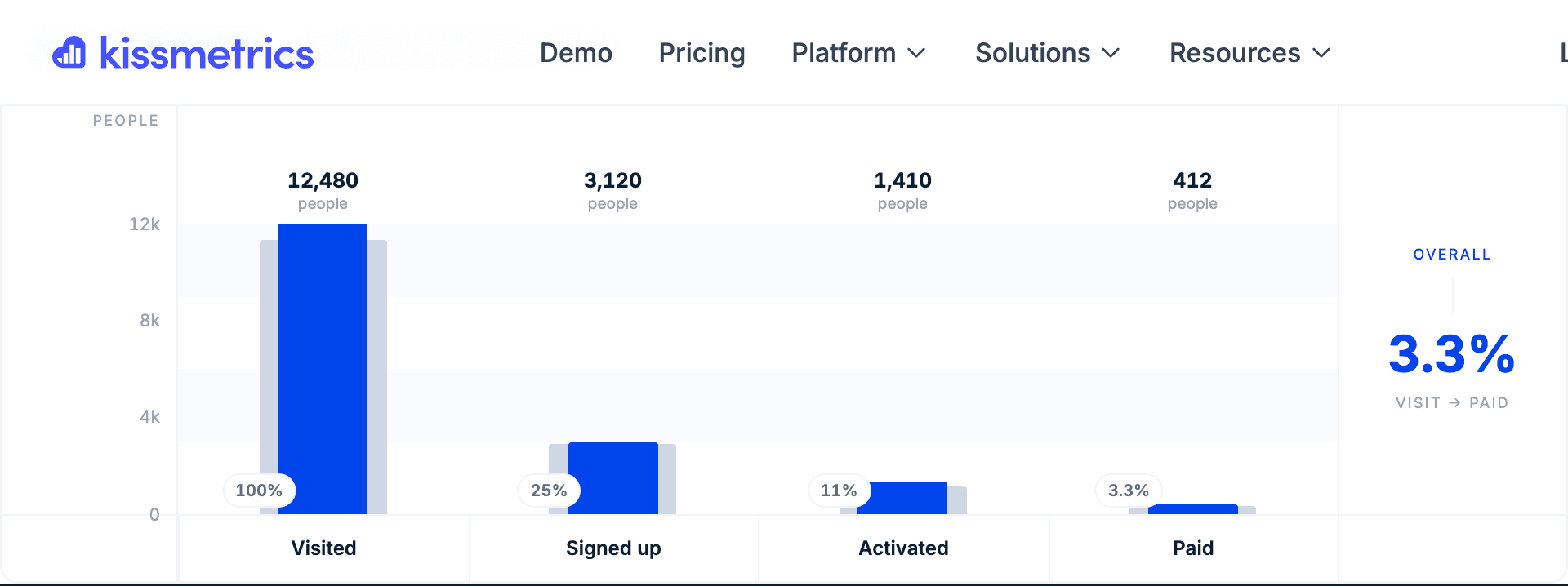
Funnel Report
Find where users drop off
The Funnel Report answers the fundamental question: "Of the people who did X, how many continued and did Y? And how many of those people continued and did Z?" It tracks sequential user actions toward conversion goals like purchases, subscriptions, or any multi-step process you define.
Get Started for FreeWhy This Report Matters
Every percentage point you recover in your funnel directly impacts revenue. A 10% improvement in checkout completion could mean hundreds of thousands in recovered revenue. Funnel reports show you exactly where to focus your optimization efforts for maximum impact.
Questions This Report Answers
If you're asking these questions, the Funnel Report is your answer.
Where do users drop off in my signup flow?
What percentage of trial users convert to paid?
Which step in checkout loses the most customers?
How do conversion rates differ by traffic source?
Is my new onboarding flow performing better?
Funnel Report in Action
Interactive demo or screenshot showcasing the Funnel Report interface, configuration options, and example insights.
Key Capabilities
Everything the Funnel Report can do for your analysis.
Multi-Step Sequential Tracking
Build funnels with any number of steps. Track users through complex journeys from first touch to final conversion, with full visibility into each transition.
Or/And Conditions
Create flexible funnels with "Or" branches for alternative paths to the same goal, or "And" requirements where users must complete multiple actions before advancing.
Property-Based Segmentation
Slice your funnel by any property - referral source, campaign, device, plan type, or custom attributes. Compare how different segments move through your funnel.
Flexible Attribution Models
Choose how to attribute conversions: first ever, last ever, first in date range, or at time of specific step. See your funnel from different attribution perspectives.
Conversion Rate Toggle
Switch between comparing each step to the previous step versus comparing all steps to the first step. Get both relative and absolute conversion views.
Skipped Steps Analysis
Compare funnel users against site-wide traffic to understand who's entering your funnel versus who's bypassing steps entirely.
Real-World Use Cases
How teams use the Funnel Report to drive business results.
Signup Flow Optimization
Track every step from landing page to account creation to first value moment.
Example:
Visited Pricing → Started Signup → Completed Signup → First Dashboard View → Invited Team Member
E-commerce Checkout
Identify cart abandonment points and optimize the path to purchase.
Example:
Added to Cart → Viewed Cart → Started Checkout → Entered Payment → Completed Purchase
Feature Adoption
Measure how users discover and adopt key product features.
Example:
Logged In → Viewed Feature Page → Started Feature → Completed Feature → Repeated Feature
Content Engagement
Track progression through content journeys and lead magnets.
Example:
Blog Visit → Downloaded Guide → Viewed Pricing → Requested Demo → Became Customer
Pro Tips
Get the most out of the Funnel Report with these expert recommendations.
Start with your most critical conversion path first - the one that directly impacts revenue.
Create separate funnels for different user segments to identify where specific groups struggle.
Use "Or" conditions to track users who might take different paths to the same goal.
Compare funnels week-over-week to catch regressions quickly after product changes.
Drill into specific steps to see individual users who dropped off - patterns often emerge.
Ready to try the Funnel Report?
Free to start. Full access to all 9 report types.